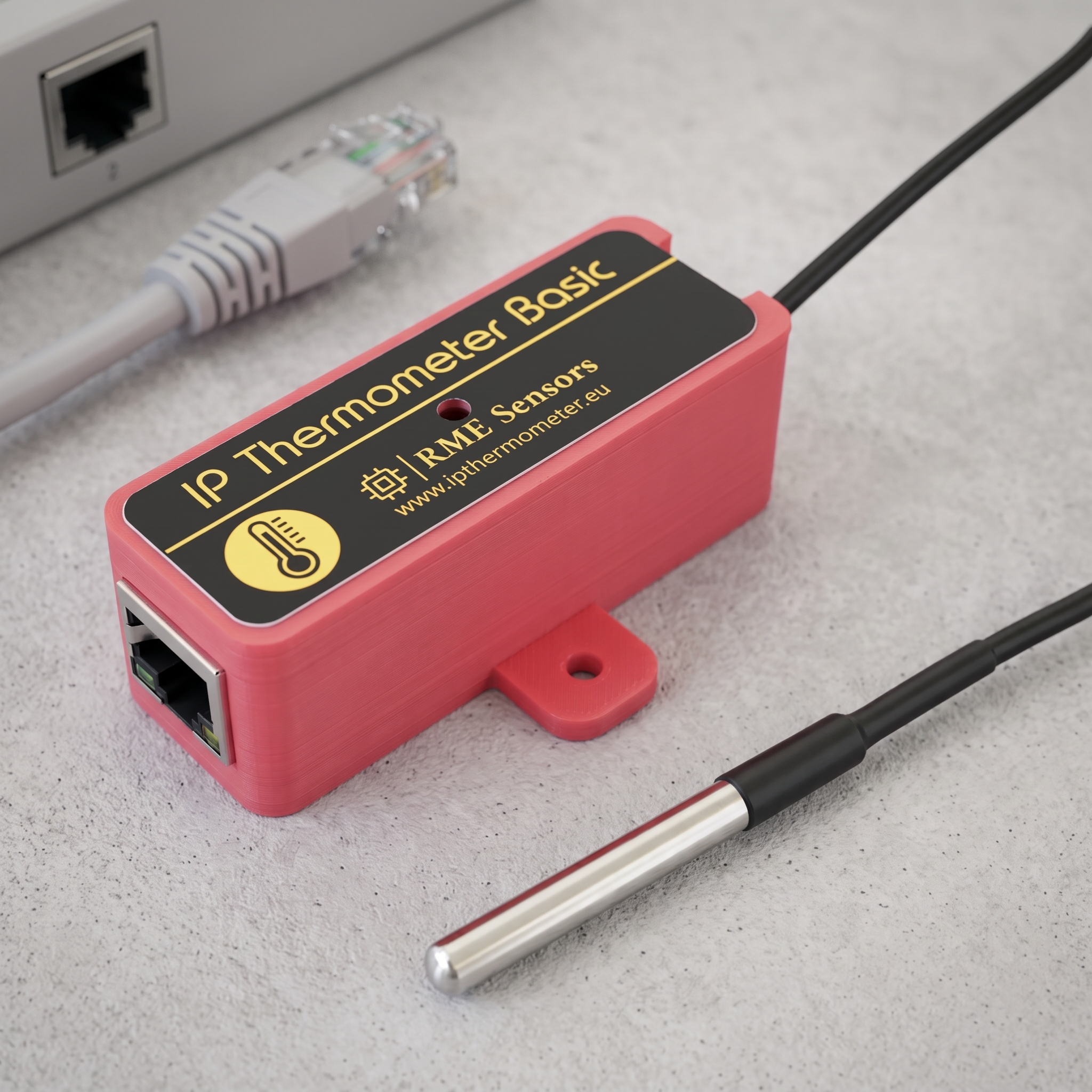
Description
🔌 Plug & Play Installation
Power via any standard USB port—no assembly required. Includes a 1m USB power cable and integrated 1m waterproof probe for immediate deployment.
🛡️ Standalone & Secure
Built-in web server operates entirely on your local network. Unlike cloud-dependent solutions (Sonoff, etc.), your device remains accessible without internet connectivity or third-party services.
🎯 Industrial-Grade Precision
Features the proven DS18B20 sensor delivering 0.1°C resolution across an extreme temperature range of -55°C to +125°C.
🚀 Enterprise-Ready Integration
Native compatibility with professional monitoring platforms including Zabbix, PRTG Network Monitor, Home Assistant, and IFTTT.
Technical Specifications
| Specification | Details |
|---|---|
| Sensor | DS18B20 (Waterproof probe, 1m integrated cable) |
| Temperature Range | -55°C to +125°C (-67°F to 257°F) |
| Resolution | 0.1°C |
| Accuracy | ±0.5°C (-10°C to +85°C) |
| Connectivity | 10Base-T Ethernet (compatible with 10/100/1000 networks) |
| Network Setup | DHCP (default) or Static IP |
| Power | USB-powered (PoE splitter compatible) |
| Display Units | Celsius/Fahrenheit toggle |
| Security | Password-protected configuration interface |
📊 Flexible Data Access Methods
📱 Web Interface
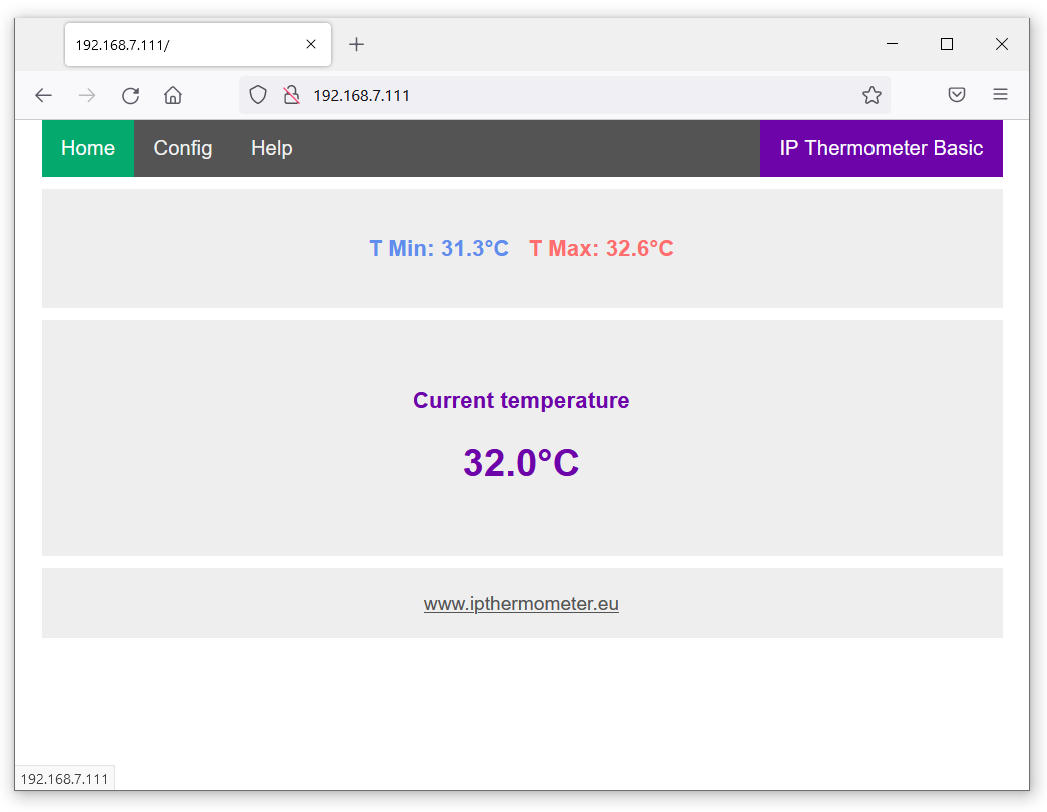
Mobile-optimized interface accessible from any browser. View live readings and historical Min/Max values by entering the device IP address.
💻 JSON API
Structured data endpoint (/prtg) ideal for custom applications, scripts, and direct integration with PRTG Network Monitor.
⚡ Simple HTTP Endpoint
Retrieve plain-text temperature via /t for lightweight integrations and automation scripts.
📡 Remote Push Notifications
Configure automated data transmission to your server or IFTTT via HTTP GET—triggered by intervals or temperature threshold alerts.
Try Before You Buy
Test the live interface:
- Full Dashboard: dev.ipthermometer.eu:8888 (Password: 1234)
- JSON Output: dev.ipthermometer.eu:8888/prtg
- Temperature (Plain Text): dev.ipthermometer.eu:8888/t
Downloads
IP Thermometer Finder for Android
IP Thermometer Finder for Windows
IP Thermometer Finder for Linux (x86_64 GUI executable )
IP Thermometer Finder for MacOS (AArch64)
📦 Package Contents
- 1× IP Thermometer Basic with integrated 1m-5m waterproof probe
- 1× USB Power Cable (1m)
rpbstuff –
Item as described, seller’s comms and service-excellent for an overseas sale++
shl-cumbria –
Great item received in good time. Many thanks from ABS Cumbria.
dagobertotorres –
The thermometer works as expected
mcvld2 –
Excellent service prompt communication very professional transaction. thanks
mjc1408 –
GREAT PRICE, FAST SHIPPING, EASY TRANSACTION!!! RECOMMENDED SELLER!!!
ago1234 –
Everything o.k. Device works very good!
modellbahn-lover –
DANKE, bin Wiederholungskäufer, weil ich so zufrieden mit den Produkten und der Kommunikation bin – sofort wieder!
juergen0804 –
Ich bin begeistert . Gerne wieder! Schnelle Lieferung aus Litauen. Der Temperaturregler ist genau das, nach dem ich gesucht habe.👏👍
vincent1409 –
Parfait merci ! All working as expected
plattlhaus –
recommended seller!
atmerry –
Thank you for great tiems!
florian vigl –
easy and simple solution. works perfectly. my dakboard dashboard is now showing the values from the ipthermometer json output. 👍
Nicola –
good work! if there was poe even better
Peter –
is it possible to automatically extract or export temperature by using a REST API?
Ricardas –
Hi, you can get temperature readings by doing a simple http request http://thermometer_ip/t
Yonas –
Hello, Is it possible to speed up from 10MBit/s to 100MBit/s. Thanks
Ricardas –
Hi, the IP thermometer uses a 10Mbit/s network module, but is fully compatible with 10/100/1000Base-T networks.
John McCulloch –
Great product, works straight out of the box. A couple of further enhancements would be great:
John McCulloch –
The option of resetting min/max as part of the query string would be great, something like:
http://ipt1/resetminmax?pass=1234
Ricardas –
This option already exists: http://thermometer_IP/1234/r
Replace 1234 with your password.
John McCulloch –
Could you explain what “Refresh WEB:” in the config does?
Ricardas –
Reloads the main web page at a set interval.
John McCulloch –
FYI – here’s a sample webservice running on IIS (.asmx page) to upload periodic data:
[WebMethod]
[ScriptMethod(UseHttpGet = true)]
public void uploadTempIPT(string temp, string deviceID)
{
var ServerDateTime = DateTime.Now;
string constr = ConfigurationManager.ConnectionStrings[“WagramEnvironment”].ConnectionString;
using (SqlConnection conn = new SqlConnection(constr))
{
SqlCommand cmd = new SqlCommand(“sp_InsertTempHumidity”, conn);
cmd.CommandType = CommandType.StoredProcedure;
cmd.Parameters.AddWithValue(“@deviceID”, deviceID);
cmd.Parameters.AddWithValue(“@temp”, temp);
cmd.Parameters.AddWithValue(“@ServerDateTime”, ServerDateTime.ToString(“yyyy-MM-dd HH:mm:ss”));
cmd.Connection = conn;
conn.Open();
cmd.ExecuteNonQuery();
conn.Close();
}
}
sample ipt config graphic attached.
Swen –
Hello,
MQTT and SNMP will be great.
Stefan –
can this be queried by an SNMP request? is there a tutorial?
Ricardas –
Hi, SNMP is not supported in this version.
Torsten –
Hello,
here another feature request.
A PoE Power over Ethernet function would be a perfect fit for your products.
best regards,
Torsten
Sebastian –
Awesome product! Keep up the good work. It’s working perfectly.
Ricardas –
Thank you, Sebastian! We really appreciate your feedback. Glad to hear it’s working perfectly for you! 😊
Tim –
Hi there, Can you tell me when the POE-version is available?
Ricardas –
Hi Tim, thanks for your comment!
I currently have a PoE splitter solution that works well with my sensors. It might be a suitable option for your needs.
https://ipthermometer.eu/poe-splitter/
Tim –
Hi there, is it possible to send a warning mail (SMTP, e.g.) after passing a specific temperature?
Ricardas –
Thanks for your question! The device doesn’t natively support SMTP or email sending, but you can easily integrate it with IFTTT service. This allows you to trigger emails, SMS, or even post temperature updates to Twitter when a certain threshold is passed.
https://www.youtube.com/watch?v=_UKMRH5wQEU